| HOW DO I SET UP A DAILY REMINDER? 1. Go to you home screen 2. Choose SETTINGS 3. Scroll down to ASSIGNMENT 4. Switch DAILY REMINDER to ON 5. Go back to SETTINGS 6. Choose NOTIFICATIONS 7. Scroll down to ASSIGNMENT 8. Choose ALERTS for ALERT STYLE Then, you have to quit and relaunch the app to make the settings take effect. Easiest way to do this is to turn your device off and on. Or, you can tap your home button once to go to the main screen. Double tap the home button, and then tap and hold on the ASSIGNMENT icon. When the red minus badge comes up, tap it to close the app. HOW DO I TURN OFF THE DAILY REMINDER? 1. Go to you home screen 2. Choose SETTINGS 3. Scroll down to ASSIGNMENT 4. Switch DAILY REMINDER to OFF Then, you have to quit and relaunch the app to make the settings take effect. Easiest way to do this is to turn you device off and then on. Or, you can tap your home button once to go to the main screen. Double tap the home button, and then tap and hold on the ASSIGNMENT icon. When the red minus badge comes up, tap it to close the app. |
WHY IS THERE A DELAY WHEN I GET A NEW RANDOM OBJECT OR SCAVENGER HUNT LIST? Good question. It's a coding thing...when you hit the REFRESH button, it reloads all the code...hence the delay. Trying to figure out another way to do it, but didn't think it was enough of an issue to delay the launch of this awesome app! WHY DOES IT SAY HIT CLOSE ON MY DAILY REMINDER? That's my bad...forgot to change it before I submitted the app..Go ahead, hit the right button to launch the app. Will be fixed when I update the app! |
| ARE YOU GOING TO UPDATE THIS APP? You know it! Already got some great assignment ideas, more random objects, scavenger hunt terms, etc. If you have any suggestions, please email me and let me know what you'd like to see. ARE YOU DEVELOPING THESE APPS FOR ANDROID TOO? When I began developing the apps, I tried to do both at the same time. However I ran into issues with the Android version, so I decided focused on the iOS versions. Now that these are done, I will turn back to the Android version! If you would like to know when it's ready, email me and I will put you on my notification list. ARE YOU DEVELOPING OTHER PHOTOGRAPHY APPS? Yes! I have more than a few ideas on future apps! If you want to be kept up to date on what new things I'm working, email me and I will put you on my notification list. |
DO YOU TEACH ONLINE COURSES? Currently in development! If you are interested, please email me and I will put you on my notification list. Stay tuned! CANON OR NIKON? Both are great systems! I shoot Nikon personally, Canon at work. You can't go wrong with either, despite what people on the internet say! Next question! ANY GOOD RESOURCES FOR PHOTO INFO? Head to LEARNPHOTO.CA and sign up for a free account to get access to lots of weblinks and other photo info. I also have a blog that I update on a somewhat regular basis! |
| Share the great images you capture using the app on our offical Flickr group! http://www.flickr.com/groups/photoassignmentapp/ |
|
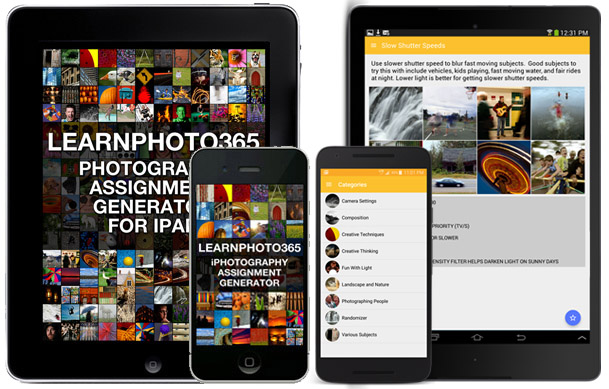
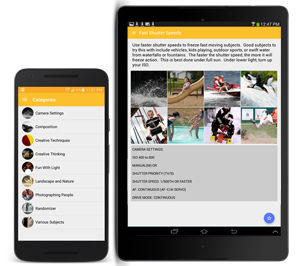
Whether you are taking on a 365 day photo challenge or just looking for inspiration shooting with your iPhone/iPod touch,the Learnphoto.ca iPhotography Assignment Generator App is perfect for you.
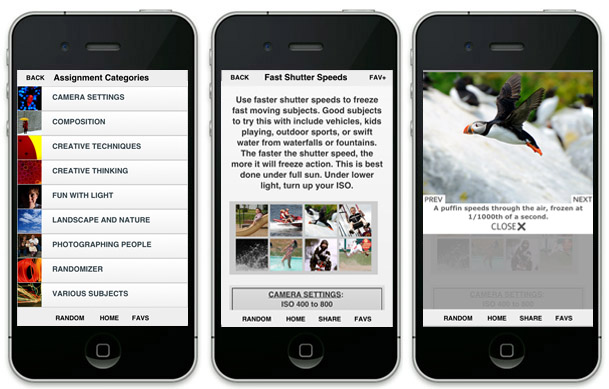
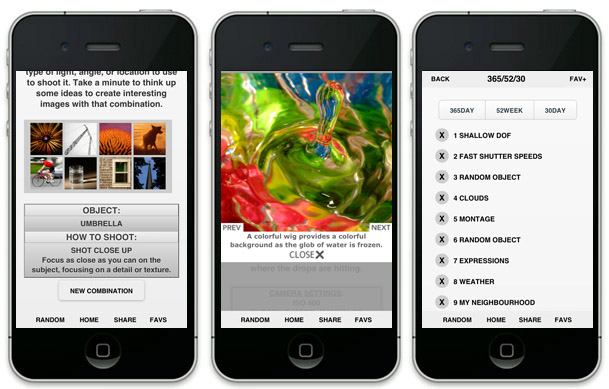
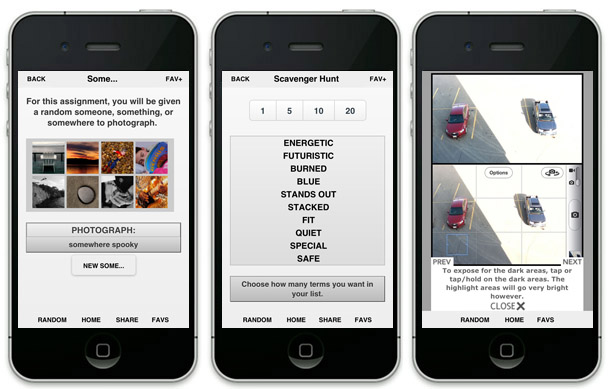
While most photo apps available let you DO things to the photographs you taken (add text, borders, filters, or special effects) this app is all about IDEAS for taking photographs. Click on the app store icon on the right to get it now for $0.99.OVER 75 INDIVIDUAL ASSIGNMENTS AND THOUSANDS OF POTENTIAL RANDOM ONES! Tailored to shooting with your iPhone/iPod, assignments range from the rules of composition, creative shooting techniques, photographing people, landscape and nature, and more subjects! Random objects and places, combined with techniques, environments, offer you hundreds of thousands of possibilities! The scavenger hunt assignment gives you lists of terms to find with your camera…with MILLIONS of possible combinations! You can choose from the list, or have the app give you one at random! Each assignment has a series of example images to demonstrate the technique or inspire you! DAILY REMINDER Taking part in a 365 day challenge? Get the app to send you a reminder each day to get your photo assignment to keep you on track. CAMERA TIPS/CAMERA+/INSTAGRAM TUTORIALS The app includes tutorials on getting better photos with your iPhone/iPod touch, as well as popular apps Camera+ and Instagram! NO NETWORK REQUIRED! The app is completely self-contained and does not require a wifi or network connection. No matter where you are, you can always get an assignment. NOTE: Due to the huge amount of content, the app must be downloaded over wi-fi or through iTunes on your computer. FREE VERSION Want to try before you buy? There is also a FREE version of the full app that contains just a fraction of the assignments available in the full paid version, but should be enough to make you want it all! It is from the full slr version, but is basically the same as the iPhone/iPod version. Get it HERE! |
| HOW DO I SET UP A DAILY REMINDER? 1. Go to you home screen 2. Choose SETTINGS 3. Scroll down to ASSIGNMENT 4. Switch DAILY REMINDER to ON 5. Go back to SETTINGS 6. Choose NOTIFICATIONS 7. Scroll down to ASSIGNMENT 8. Choose ALERTS for ALERT STYLE Then, you have to quit and relaunch the app to make the settings take effect. Easiest way to do this is to turn your device off and on. Or, you can tap your home button once to go to the main screen. Double tap the home button, and then tap and hold on the ASSIGNMENT icon. When the red minus badge comes up, tap it to close the app. HOW DO I TURN OFF THE DAILY REMINDER? 1. Go to you home screen 2. Choose SETTINGS 3. Scroll down to ASSIGNMENT 4. Switch DAILY REMINDER to OFF Then, you have to quit and relaunch the app to make the settings take effect. Easiest way to do this is to turn you device off and then on. Or, you can tap your home button once to go to the main screen. Double tap the home button, and then tap and hold on the ASSIGNMENT icon. When the red minus badge comes up, tap it to close the app. |
WHY IS THERE A DELAY WHEN I GET A NEW RANDOM OBJECT OR SCAVENGER HUNT LIST? Good question. It's a coding thing...when you hit the REFRESH button, it reloads all the code...hence the delay. Trying to figure out another way to do it, but didn't think it was enough of an issue to delay the launch of this awesome app! |
| ARE YOU GOING TO UPDATE THIS APP? You know it! Already got some great assignment ideas, more random objects, scavenger hunt terms, etc. If you have any suggestions, please email me and let me know what you'd like to see. ARE YOU DEVELOPING THESE APPS FOR ANDROID TOO? When I began developing the apps, I tried to do both at the same time. However I ran into issues with the Android version, so I decided focused on the iOS versions. Now that these are done, I will turn back to the Android version! If you would like to know when it's ready, email me and I will put you on my notification list. ARE YOU DEVELOPING OTHER PHOTOGRAPHY APPS? Yes! I have more than a few ideas on future apps! If you want to be kept up to date on what new things I'm working, email me and I will put you on my notification list. |
DO YOU TEACH ONLINE COURSES? Currently in development! If you are interested, please email me and I will put you on my notification list. Stay tuned! CANON OR NIKON? Both are great systems! I shoot Nikon personally, Canon at work. You can't go wrong with either, despite what people on the internet say! Next question! ANY GOOD RESOURCES FOR PHOTO INFO? Head to LEARNPHOTO.CA and sign up for a free account to get access to lots of weblinks and other photo info. I also have a blog that I update on a somewhat regular basis! |
| Share the great images you capture using the app on our offical Flickr group! http://www.flickr.com/groups/iphotographyassignment/ |
![]() |
Whether you are taking on a 365 day photo challenge or just looking for inspiration the Learnphoto.ca Photography Assignment Generator App for iPad is perfect for you.
While most photo apps out there let you DO things to the photos you have taken (add text, borders, effects, etc) this app is all about IDEAS for shooting. Click on the app store icon on the right to get it now for $2.99.OVER 100 INDIVIDUAL ASSIGNMENTS AND THOUSANDS OF POTENTIAL RANDOM ONES! Everything from camera settings, rules of composition, creative shooting techniques, photographing people, landscape and nature, and more subjects! Random objects and places, combined with techniques, environments, offer you hundreds of thousands of possibilities! The scavenger hunt assignment gives you lists of terms to find with your camera…with MILLIONS of possible combinations! You can choose from the list, or have the app give you one at random! OVER 700 EXAMPLE IMAGES Each assignment has a series of example images to demonstrate the technique or inspire you! DAILY REMINDER Taking part in a 365 day challenge? Get the app to send you a reminder each day to get your photo assignment to keep you on track. NO NETWORK REQUIRED! The app is completely self-contained and does not require a wifi or network connection. No matter where you are, you can always get an assignment. NOTE: Due to the huge amount of content, the app must be downloaded over wi-fi or through iTunes on your computer. FREE VERSION Try before you buy! Get the free version HERE. |
| HOW DO I SET UP A DAILY REMINDER? 1. Go to you home screen 2. Choose SETTINGS 3. Scroll down to ASSIGNMENT 4. Switch DAILY REMINDER to ON 5. Go back to SETTINGS 6. Choose NOTIFICATIONS 7. Scroll down to ASSIGNMENT 8. Choose ALERTS for ALERT STYLE Then, you have to quit and relaunch the app to make the settings take effect. Easiest way to do this is to turn your device off and on. Or, you can tap your home button once to go to the main screen. Double tap the home button, and then tap and hold on the ASSIGNMENT icon. When the red minus badge comes up, tap it to close the app. HOW DO I TURN OFF THE DAILY REMINDER? 1. Go to you home screen 2. Choose SETTINGS 3. Scroll down to ASSIGNMENT 4. Switch DAILY REMINDER to OFF Then, you have to quit and relaunch the app to make the settings take effect. Easiest way to do this is to turn you device off and then on. Or, you can tap your home button once to go to the main screen. Double tap the home button, and then tap and hold on the ASSIGNMENT icon. When the red minus badge comes up, tap it to close the app. |
WHY IS THERE A DELAY WHEN I GET A NEW RANDOM OBJECT OR SCAVENGER HUNT LIST? Good question. It's a coding thing...when you hit the REFRESH button, it reloads all the code...hence the delay. Trying to figure out another way to do it, but didn't think it was enough of an issue to delay the launch of this awesome app! WHY DOES IT SAY HIT CLOSE ON MY DAILY REMINDER? That's my bad...forgot to change it before I submitted the app..Go ahead, hit the right button to launch the app. Will be fixed when I update the app! |
| ARE YOU GOING TO UPDATE THIS APP? You know it! Already got some great assignment ideas, more random objects, scavenger hunt terms, etc. If you have any suggestions, please email me and let me know what you'd like to see. ARE YOU DEVELOPING THESE APPS FOR ANDROID TOO? When I began developing the apps, I tried to do both at the same time. However I ran into issues with the Android version, so I decided focused on the iOS versions. Now that these are done, I will turn back to the Android version! If you would like to know when it's ready, email me and I will put you on my notification list. ARE YOU DEVELOPING OTHER PHOTOGRAPHY APPS? Yes! I have more than a few ideas on future apps! If you want to be kept up to date on what new things I'm working, email me and I will put you on my notification list. |
DO YOU TEACH ONLINE COURSES? Currently in development! If you are interested, please email me and I will put you on my notification list. Stay tuned! CANON OR NIKON? Both are great systems! I shoot Nikon personally, Canon at work. You can't go wrong with either, despite what people on the internet say! Next question! ANY GOOD RESOURCES FOR PHOTO INFO? Head to LEARNPHOTO.CA and sign up for a free account to get access to lots of weblinks and other photo info. I also have a blog that I update on a somewhat regular basis! |
| Share the great images you capture using the app on our offical Flickr group! http://www.flickr.com/groups/iphotographyassignment/ |
| HOW DO I SET UP A DAILY REMINDER? 1. Go to you home screen 2. Choose SETTINGS 3. Scroll down to ASSIGNMENT 4. Switch DAILY REMINDER to ON 5. Go back to SETTINGS 6. Choose NOTIFICATIONS 7. Scroll down to ASSIGNMENT 8. Choose ALERTS for ALERT STYLE Then, you have to quit and relaunch the app to make the settings take effect. Easiest way to do this is to turn your device off and on. Or, you can tap your home button once to go to the main screen. Double tap the home button, and then tap and hold on the ASSIGNMENT icon. When the red minus badge comes up, tap it to close the app. HOW DO I TURN OFF THE DAILY REMINDER? 1. Go to you home screen 2. Choose SETTINGS 3. Scroll down to ASSIGNMENT 4. Switch DAILY REMINDER to OFF Then, you have to quit and relaunch the app to make the settings take effect. Easiest way to do this is to turn you device off and then on. Or, you can tap your home button once to go to the main screen. Double tap the home button, and then tap and hold on the ASSIGNMENT icon. When the red minus badge comes up, tap it to close the app. |
WHY IS THERE A DELAY WHEN I GET A NEW RANDOM OBJECT OR SCAVENGER HUNT LIST? Good question. It's a coding thing...when you hit the REFRESH button, it reloads all the code...hence the delay. Trying to figure out another way to do it, but didn't think it was enough of an issue to delay the launch of this awesome app! |
| WHAT ABOUT AN IPAD VERSION? Under development! If you want to be notified once the iPad version is ready, email me! The apps will run on the iPad, but at iPhone size. If you make it go full screen the photos look pixelated! ARE YOU DEVELOPING THESE APPS FOR ANDROID TOO? When I began developing the apps, I tried to do both at the same time. However I ran into issues with the Android version, so I decided focused on the iOS versions. Now that these are done, I will turn back to the Android version! If you would like to know when it's ready, email me and I will put you on my notification list. ARE YOU DEVELOPING OTHER PHOTOGRAPHY APPS? Yes! I have more than a few ideas on future apps! If you want to be kept up to date on what new things I'm working, email me and I will put you on my notification list. |
DO YOU TEACH ONLINE COURSES? Currently in development! If you are interested, please email me and I will put you on my notification list. Stay tuned! CANON OR NIKON? Both are great systems! I shoot Nikon personally, Canon at work. You can't go wrong with either, despite what people on the internet say! Next question! ANY GOOD RESOURCES FOR PHOTO INFO? Head to LEARNPHOTO.CA and sign up for a free account to get access to lots of weblinks and other photo info. I also have a blog that I update on a somewhat regular basis! |
| Thank you for checking out my photography apps. If you have any questions, I'd be happy to answer them! If you've downloaded one of the apps, I'd love to get your feedback on it! What do you like about it? Anything I need to change or add? Features you'd like to see? I'd also appreciate letting me know if there are any bugs or functional issues with the apps, or even spelling errors! All your feedback will help make these apps even better! Please contact me via email at app@learnphoto.ca Don't forget to rate and review the apps on the app store! |
ABOUT NOELNoel Chenier is an award winning photographer and educator based in Quispamsis, New Brunswick, Canada. He recieved a Diploma of Fine Craft in Photography in 1997 from the NB College of Craft and Design. Soon after graduating, Noel was hired by the New Brunswick Telegraph Journal, the provincial daily newspaper, as their staff photographer. Over his career, he has covered a broad range of subjects, from peace keeping in war torn Bosnia, Kosovar Refugees, royal visits, major sporting events, and daily. Noel's work has appeared in newspapers, magazines, online, and exhibited across the world. His work has won 3 Atlantic Journalism Awards for Feature and Spot News Photography, with six other nominations. Noel's portolio can be viewed at www.noelchenier.ca Noel is also a part-time photography instructor, having taught and lectured at New Brunswick College of Craft and Design, the University of New Brunswick, and St Thomas University, as well as courses for the general public. Noel has a Bachelor of Adult Education and a Masters of Education from the University of New Brunswick. To find out more info on his courses and see some of the great work done by his students, head to www.learnphoto.ca |